Skip to content

LOOK BEYOND THE NUMBER

PTE AI scoring.
Understand the feedback.

Swiftuni provides AI-assisted practice scores and feedback for supported PTE speaking and writing tasks. Use the response, criteria and suggestions together to identify what needs work. These are preparation estimates—not official Pearson scores, a published Pearson scoring formula or a promise of exam performance.

Choose Academic or Core in your account. Access depends on your plan and available usage tokens.

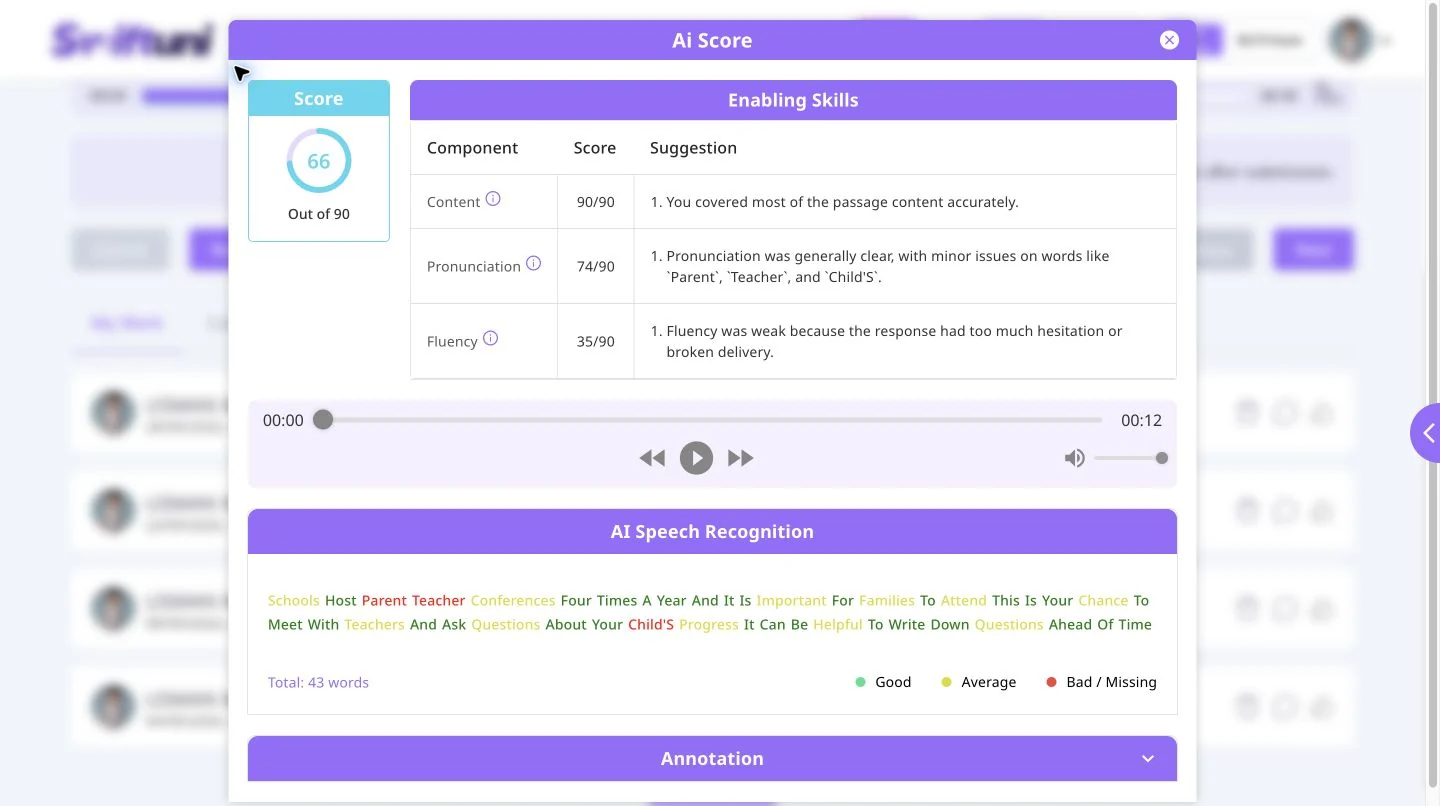
Actual Swiftuni Read Aloud AI feedback showing criteria, suggestions, audio playback and highlighted speech recognition
Real practice feedback · An existing attempt, not an official score

READ THE EXAMPLE

Three parts worth looking at.

The real Read Aloud report above shows more than a total. Use each part for a different review question.

  1. Criteria and suggestions

    Read the content, pronunciation and fluency rows separately. In this attempt, fluency feedback highlights hesitation and broken delivery.

  2. Your recording

    Use playback to check the suggestion against what was actually said. A number cannot tell the whole story of a response.

  3. Recognised words

    The speech-recognition section highlights words for review. Check them against the audio; recognition and annotations can be imperfect.

TASK FIRST. CRITERIA SECOND.

What can the feedback help you review?

Speaking responses

Supported extended tasks can include content, pronunciation and fluency feedback. Situational responses may also consider appropriacy. Not every speaking question uses these same criteria.

  • Did your response address the prompt?
  • Which words or pauses need listening back?
  • Was the message appropriate to the situation?

Writing responses

Supported writing tasks can include feedback on content, form, grammar, vocabulary and spelling. Email feedback can also address organisation and email conventions.

  • Did you include the information requested?
  • Did you follow the task’s form requirements?
  • Which language choices need revision?

FEEDBACK IS A STARTING POINT

Keep the next improvement small.

  1. Read the prompt again

    Check what the task actually asked before interpreting your result.

  2. Check your response

    Listen to the recording or read your writing, alongside the available comments.

  3. Choose one issue

    Focus on a specific omission, unclear phrase or recurring language problem.

  4. Practise and compare

    Try again with that focus and review the available attempts, not just the totals.

IMPORTANT LIMITATIONS

Helpful guidance.
Not an official result.

Audio quality and speech recognition can affect analysis. AI can misunderstand a response or provide imperfect suggestions. Check questionable feedback against the original answer, and do not assume a score proves that you are ready for the official exam.

Swiftuni is an independent preparation platform. It does not provide Pearson results or guarantee equivalence with Pearson’s scoring.

Return to speaking practice

BEFORE YOU BEGIN

A few things worth knowing.

How accurate is Swiftuni’s PTE AI scoring?

It is a practice estimate, not a verified prediction of your official exam score. Results depend on the task, response and recording quality. Use the feedback alongside your own review; Swiftuni does not promise a particular accuracy percentage or result.

Why do different tasks show different criteria?

Each task asks you to do something different. A short answer, an extended spoken response and a written email cannot be reviewed using an identical checklist. Follow the criteria available for the specific task.

Why might two attempts receive different feedback?

Changes in wording, completeness, pace, pauses and recording quality may affect the analysis. Recognition errors can also matter. Compare the responses themselves before drawing conclusions from the numbers.

Is AI evaluation unlimited?

Not necessarily. Evaluation access depends on your subscription, available tokens and the task. Check your account for current limits before submitting.

MAKE YOUR NEXT SESSION COUNT

Make feedback useful.

Open Swiftuni in your browser, select your exam and choose a task that fits today.

Open the web app Check practice plans